


Definitive Guide to Understanding Your Dive Computer
Discover how the most important device in your gear works and why it is the key to maximizing your bottom time in total safety.
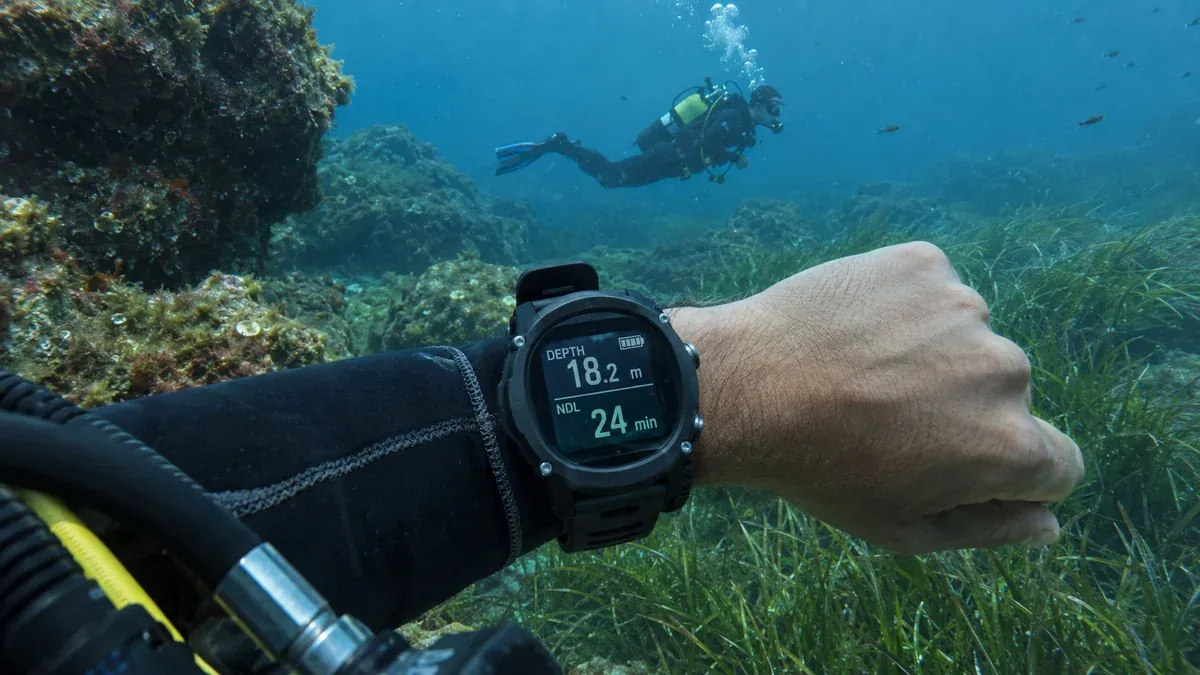
The dive computer has evolved from a luxury item to a fundamental piece of gear for any diver, from entry- level to technical. Its main function is to calculate the body's absorption and elimination of nitrogen during a dive, allowing you to safely extend bottom time and eliminating the need to manually calculate dive profiles with traditional tables.
Despite its importance, many divers jump into the water knowing only the basic functions of their device. Deeply understanding what information it provides, how it calculates it, and what settings it requires is essential to guarantee safety underwater.
What exactly is it and why is it indispensable?
A dive computer is a pressure-resistant electronic device that constantly monitors depth and dive time. Using these two empirical data points and applying them to a pre-programmed mathematical model, the computer calculates how much nitrogen is dissolving into body tissues in real-time.
The Multilevel Profile Advantage
Unlike dive tables, which assume you spend the entire time at maximum depth (generating a very conservative calculation), the computer adjusts its calculations instantly. If you ascend to a shallower area, the device recognizes the lower ambient pressure and grants you more dive time.
The equipment's brain: Decompression algorithms
To understand your dive computer, you must realize that it is not infallible; it is a machine running a decompression algorithm. Algorithms are theoretical mathematical models that simulate how different body "compartments" (blood, muscles, bones, fatty tissues) absorb and release gases under pressure.
No single algorithm is absolutely "better" than another. Some are more liberal (allowing more bottom time) and others more conservative. The crucial thing is knowing that the computer doesn't know how you feel, if you are dehydrated, tired, or overweight; it only calculates based on standardized formulas, so the diver must always add their own margin of common sense.
Bühlmann (ZHL-16)
- Focus and characteristics: Classic and transparent. Allows a high degree of customization through Gradient Factors (GF) to adjust conservatism.
- Typical diver profile: Technical divers, advanced, and profiles requiring maximum customization.
RGBM
- Focus and characteristics: Reduced Gradient Bubble Model. Focuses on preventing the formation of silent microbubbles, limiting bounce dives.
- Typical diver profile: Recreational divers; very common in brands like Suunto or Mares.
DSAT
- Focus and characteristics: Developed for recreational teaching (PADI). Tends to be a bit more liberal, allowing more time on the first dive.
- Typical diver profile: Recreational divers performing no- decompression dives.
Critical data on the main screen
The amount of numbers on the screen can be overwhelming at first. However, during a standard recreational dive, there are four vital pieces of data you must constantly monitor to ensure a safe dive within the limits.
1. No-Decompression Limit (NDL)
The most important number. Indicates how many minutes you have left at the current depth before incurring a decompression obligation. The golden rule of recreational diving is to never let the NDL reach zero.
2. Current and Max Depth
Shows exactly how many meters deep you are in real-time and records the maximum depth reached. Fundamental for the logbook and to ensure you do not exceed your certification limits.
3. Dive Time
A precise timer that automatically activates upon contact with water (usually past 1 or 1.5 meters) and stops when you return to the surface, documenting the total bottom time.
4. Ascent Rate
Ascending too fast causes barotrauma. Computers use visual side bars or audible alarms to warn you if you exceed the safe speed, established between 9 and 18 meters per minute.
Pre-dive settings
A poorly configured computer can provide dangerously inaccurate data. Before boarding or entering the water, every diver must review and adjust certain environmental and gas parameters so the algorithm works with the correct information.
Attention with Gas Mixtures (Nitrox)
If you dive with Enriched Air, you must indicate the exact oxygen percentage (e.g., 32%). If you leave it set to standard air (21%), you will not take advantage of the extended no-decompression limit. Worse still, if you dive with air but the computer is set to Nitrox, you will be at serious risk of decompression sickness.
Besides the gas mixture, consider adjusting the Conservatism Level. If you are tired, cold, have poor hydration, or are going to perform multiple consecutive dives over several days, it is highly recommended to adjust the computer to a more restrictive mode.
Finally, verify the Fresh Water vs. Salt Water setting. Water density affects the ambient pressure reading; selecting the correct type ensures the displayed depth is precisely accurate.
Additional safety features
- The Safety Stop: Almost all computers will automatically request a 3-minute stop at 5 meters depth at the end of the dive. Although this stop is optional in recreational diving (unless you approached the NDL limit), always performing it facilitates the elimination of microbubbles.
- Time to Fly: After diving, residual nitrogen remains. Your computer will calculate and display a countdown timer (usually 12 to 24 hours) indicating when it is safe to take a pressurized commercial flight.
Basic device maintenance
Electronic equipment operating at high pressures and submerged in saltwater requires methodical care to prevent catastrophic failures during the dive or long-term damage to its internal components.
Post-Dive Care Protocol
- Thorough rinsing: After each day of diving, soak the computer in warm fresh water for a few minutes to dissolve salt crystals. Avoid high-pressure water jets.
- Proper drying: Let it air dry in a cool, shaded place. Extreme heat from direct sunlight can damage the LCD screen or drain the battery.
- Battery management: If you have a model with a replaceable battery, make sure to change the O-ring and lubricate it with the appropriate silicone grease. If in doubt, consult a technician.
Conclusion
Technology has made diving more accessible, prolonged, and safer than ever. However, the screen on your wrist or console does not replace training, pre-planning, and prudence underwater.
Familiarizing yourself with your device's menus on dry land, understanding the visual and audible alerts, and knowing how to interpret its data will make you a much more autonomous diver, aware of your surroundings. Underwater, clear and understood information is the best tool to ensure every dive ends with a smile on the surface.
